
The Flight Tracker
Impala StudiosTravel & Local
3.93.10K Reviews
- Version
- 3.2.1
- Installs
- 5.00M
- Age Rating
- Everyone
Screenshots
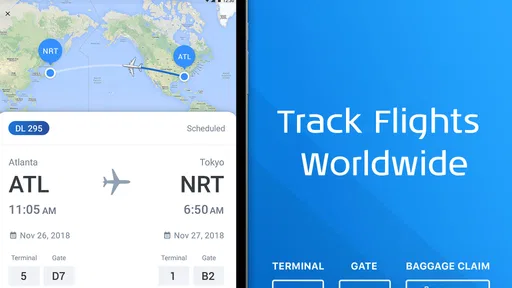
Our Review of The Flight Tracker
 Analysis by Appyee
Ever found yourself at the airport, juggling your bags and trying to figure out if your flight is on time? Or maybe you're waiting on a loved one and just want to know when to expect them? That's where The Flight Tracker app comes in. I recently took it for a spin, and I have to say, it might just be your new travel buddy.
What to expect when checking a flight
A flight-tracking app earns its place on my phone when it answers a simple question quickly: should I leave now, wait a little longer, or change my plans? This one is aimed at that practical moment. It is a free travel and local app from Impala Studios, and its focus is following flight status and getting updates about arrivals or departures. I would think of it as a handy companion for a specific travel task, not as a complete trip-planning system.
For a traveler, the useful habit is to check the flight before setting off for the airport, then keep an eye on it as departure gets closer. For someone collecting a passenger, checking again before leaving home can help avoid spending unnecessary time at the terminal. Flight information can change, so I still treat an app as a helpful signal rather than a reason to ignore airport announcements or an airline’s own instructions.
A practical workflow for arrivals and departures
If I were meeting a friend, I would save or look up the relevant flight early, then use the status updates to decide when to head out. That is more useful than repeatedly searching from scratch, especially when I am trying to coordinate around work, traffic, or another errand. The key trade-off is that an update is only valuable if I notice it in time, so I would allow the notifications I actually want and keep the phone accessible during the travel window.
For my own trip, I would check both ends of the journey before packing or leaving. A status change can affect when I need to arrive, while the destination’s conditions may shape what I bring. I would avoid treating a forecast or a status display as a guarantee: weather and airport operations can shift, and the final decisions still belong to the airline and airport staff.
This kind of workflow is especially useful when plans involve more than one person. A traveler can monitor their own departure while a relative watches the arrival, reducing the need for a stream of “are you there yet?” messages. It is also a simple way to keep a short list of trips in view when several family members are flying around the same time. I would keep that list focused, though; tracking only the flights that matter makes it easier to spot a meaningful change.
Getting Started with The Flight Tracker
Downloading The Flight Tracker on my phone was a breeze. The app is available for both Android and iOS, so no matter what device you’re rocking, you’re covered. Once installed, I was greeted with a sleek and user-friendly interface. The design is intuitive, making it super easy to navigate even if you’re not exactly tech-savvy.
Tracking Flights Like a Pro
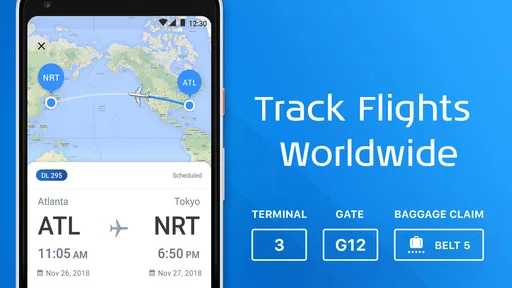
Right off the bat, I was impressed by how easy it was to search for flights. Whether you know the flight number or just the departure and arrival cities, the app quickly pulls up the relevant details. I tried tracking a flight I was planning to take, and within seconds, I had all the information I needed right at my fingertips.
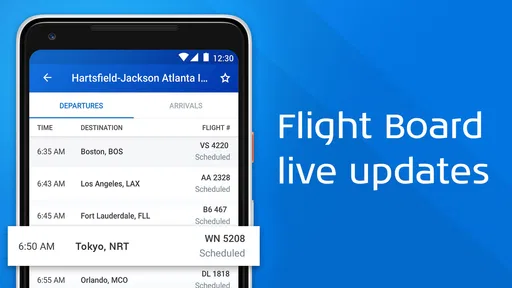
One feature that really caught my eye was the real-time updates. The app sends notifications for any changes in flight status, delays, or gate changes. This means you can relax and let the app do the worrying for you. I found this particularly handy while waiting for a friend’s flight to arrive; I didn’t have to keep checking the board since the app kept me in the loop.
How it fits alongside other travel tools
I would use a dedicated tracker differently from an airline’s own app. A tracker is convenient when I want to follow a flight without navigating through booking details, while the airline is the better place to handle a reservation, check-in, baggage questions, or instructions tied to my ticket. Airport boards remain useful once I am inside the terminal, where a quick glance can confirm what is being shown locally. These tools serve different purposes, so I would not rely on one as a complete replacement for the others.
For a person who only flies occasionally, the main benefit is having flight progress in one place without needing to become an expert in airport systems. Frequent flyers may value keeping an eye on several journeys, but they should decide whether a separate tracker adds anything beyond the airline apps they already use. If all I need is a one-time gate or check-in instruction, the airline’s app is likely the more direct choice.
Exploring Additional Features
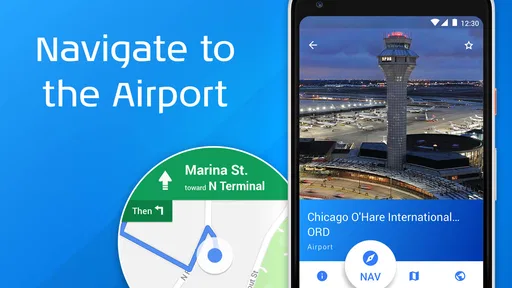
The Flight Tracker isn’t just about tracking flights. It also offers a comprehensive airport map feature. This is a lifesaver if you’re navigating a large or unfamiliar airport. I tested it out at my local airport and found it incredibly accurate and helpful.
Another cool feature is the weather updates for both departure and arrival cities. This can be quite handy for planning your trip or just knowing what to pack. The app also allows you to save flights, which is great if you’re a frequent flyer or just want to keep tabs on multiple flights at once.
There is a useful distinction between preparing at home and finding your way once you arrive. A saved flight can keep the journey easy to revisit, while an airport map is most valuable when you are already dealing with a terminal’s corridors, signs, and time pressure. I would look at the map before setting out if I know I will need to find a particular area, then use the airport’s own signs as I move around. That avoids assuming a digital map replaces current on-site directions.
Weather information is best treated as context, not a promise about the flight. Seeing conditions for the origin and destination can help me choose clothing or think ahead about a change of plan, but it cannot tell me exactly how an airline will respond. That distinction makes the feature more helpful: it informs preparation without pretending to settle decisions that belong to the carrier.
Speed, stability, and busy travel days
In everyday use, the important measure of speed is how quickly I can get from opening the app to the flight I care about. A simple search by flight number is the most direct route when I already have the details; searching by cities is a useful fallback when I do not. I would keep the flight number handy in a message or itinerary before starting the search, rather than trying to remember it while standing in a noisy terminal.
On a crowded travel day, several small tasks can compete for attention: checking a status, coordinating a pickup, consulting a map, and keeping an eye on weather. The app brings several travel-related checks into the same general workflow, but I would still avoid relying on my phone as the only source of critical information. Network access, battery life, and changing airport circumstances can all affect how convenient any phone-based tool feels. A screenshot or a note with essential journey details can be sensible backup preparation, while live updates still need a connection to reach me.
I also would not leave every alert enabled simply because notifications are available. The better approach is to choose the changes that would actually alter my plans. For an arrival pickup, a status change is more important than repeatedly checking details that have not changed; for my own departure, I would stay attentive to the airline’s direct instructions as well. This keeps the phone from becoming a source of distraction when I am already navigating a busy airport.
Customizing Your Experience
I appreciated the level of customization available in the app. You can tailor notifications to suit your preferences, ensuring you only get alerted about the things that matter most to you. Additionally, the app supports multiple languages, making it accessible for international travelers.
If you're someone who likes to keep their travel organized, the app’s integration with your calendar is a nifty feature. You can sync your flights to your calendar with just a tap, ensuring you never forget a flight.
Who will get the most from it?
I would recommend this kind of flight companion most to people who regularly meet arriving passengers, travel often enough to have multiple flights to follow, or want a quick way to check status without digging through a booking. It can also suit a less frequent traveler who prefers to prepare in advance and wants a simple reference for the journey. The value is less obvious if you rarely fly and already get everything you need from an airline app or a person traveling with you.
It is also not the right choice if you expect one app to manage the entire trip from purchase to boarding. A tracker helps with awareness; it is not a substitute for a ticket, check-in process, airline support, or the airport’s live directions. If your priority is managing a booking or resolving a disruption, I would go directly to the airline. If your priority is following a flight’s progress or coordinating a pickup, a dedicated tracker makes more sense.
Device fit, cost, and sensible expectations
The app’s current version is 3.1.0, and its age rating is Everyone. It has an average rating of 4.0 from around 34,000 ratings, with more than five million installs. Those figures suggest it has reached a broad audience, but they do not tell me whether it will suit every person’s routine; what matters is whether its flight checks and alerts fit the way you travel.
It is free to download, with in-app purchases ranging from $0.99 to $31.99 per item. I would start with the free experience and decide whether any optional purchase solves a real need before spending. The minimum operating system is 8.0, a practical detail worth checking on an older device before planning to depend on it during a trip. Its developer, Impala Studios, positions it in the travel and local space rather than as a general organization tool.
Performance expectations should stay grounded. Flight tracking involves changing information, and no app can make an airline decision happen faster or ensure every update arrives at the exact moment a traveler wants it. I would use it for convenient monitoring, then confirm important changes through the airline or airport when a decision has serious consequences. That cautious approach is not a flaw unique to this app; it is a sensible way to use any live travel information.
Wrapping It Up
After spending some quality time with The Flight Tracker, I can confidently say it’s a solid tool for anyone who flies regularly or just wants peace of mind when it comes to air travel. The real-time updates, easy-to-use interface, and additional features make it a must-have app for travelers.
Next time you’re heading to the airport or waiting for a flight, give The Flight Tracker a whirl. It might just take some of the stress out of your travel experience, leaving you to focus on the more exciting parts of your journey.
My performance verdict
For me, the strongest reason to keep it available is not a promise of perfect speed or uninterrupted service; it is the convenience of having a flight to check and a way to receive relevant updates. I would use it as a focused companion, especially for arrivals and departures that affect a pickup or a day’s schedule. A traveler who needs booking management should pair it with the airline’s app, while someone who wants a quick status check can use this as a more direct option.
Overall, I see it as a practical choice for people who benefit from following flights, with useful extras for planning and getting around. The main trade-off is familiar: live travel information is helpful, but it should not be the sole authority when a gate, departure, or connection matters. Used with that in mind, it can make the waiting and coordinating parts of a trip feel more manageable without asking it to do a job it was not built for.
Verdict
Strengths of The Flight Tracker
- Comprehensive flight details available.
- Real-time updates on flight changes.
- User-friendly interface for easy navigation.
- Customizable alerts for flight status.
- Offline access to saved flight info.
Limitations of The Flight Tracker
- Requires premium for advanced features.
- Occasional delays in data updates.
- Ads in free version can be intrusive.
- Limited airport information coverage.
- Battery usage is relatively high.
Similar Picks in This Category
View All
Google Maps
Google LLC3.4

Google Maps Go
Google LLC4.1

Booking.com: Hotels & Travel
Booking.com Hotels & Vacation Rentals4.8

Google Earth
Google LLC3.8

Skyscanner Flights Hotels Cars
Skyscanner Ltd4.8

trivago: Compare hotel prices
trivago N.V.4.4
Frequently Asked Questions
What features does The Flight Tracker offer for monitoring flights?
The Flight Tracker provides a comprehensive suite of features for monitoring flights. Users can track real-time flight status, view detailed departure and arrival times, and access terminal and gate information. Additionally, the app offers a flight search function, airport delay information, and customizable notifications to keep users informed about their travel plans.
Is The Flight Tracker available for both Android and iOS devices?
Yes, The Flight Tracker is available for both Android and iOS devices. You can download it from the Google Play Store for Android devices and the Apple App Store for iOS devices. The app offers a consistent experience across both platforms, ensuring that users have access to its full range of features regardless of their device type.
Does The Flight Tracker require an internet connection to function?
An internet connection is essential for The Flight Tracker to provide real-time updates and accurate flight information. While some features, such as saved flight details, may be accessible offline, users will need internet access to receive live flight status updates and notifications about changes in flight schedules or gate assignments.
How user-friendly is The Flight Tracker for first-time users?
The Flight Tracker is designed with a user-friendly interface that makes it accessible to first-time users. The app features intuitive navigation and clear labeling, which simplifies the process of searching for flights and monitoring their status. Additionally, the app provides helpful tutorials and guides to assist new users in getting the most out of its features.
Are there any costs associated with using The Flight Tracker?
The Flight Tracker offers a free version with basic features sufficient for casual users. However, there is also a premium version available for purchase, which includes advanced features such as ad removal, detailed weather updates, and more frequent flight alerts. Users can choose the version that best fits their needs and budget.
